The Government of Jharkhand manages thousands of employees working across departments, districts, schools, hospitals, revenue offices, and administrative units spread throughout the state. Tracking salary records, leave applications, service histories, and HR data manually for such a large workforce is neither efficient nor accurate. To solve this, the Jharkhand government launched HRMS Jharkhand — the official Human Resource Management System at hrms.jharkhand.gov.in — also known as Manav Sampada Jharkhand. This portal gives every Jharkhand state government employee digital access to payroll, leave management, service records, Annual Confidential Reports, Annual Property Returns, and all HR self-service functions through a single, secure login.
What Is HRMS Jharkhand?
HRMS Jharkhand, also referred to as Manav Sampada Jharkhand, is the official Human Resource Management System of the Government of Jharkhand. It is a centralised digital platform that replaces traditional paper-based service books and manual HR processes with a fully electronic system. Every Jharkhand state government employee is assigned a unique identifier — their GPF (General Provident Fund) number, CPS (Contributory Pension Scheme) number, or PRAN (Permanent Retirement Account Number) — which serves as the foundation of their complete digital HR profile on the portal.
Who Can Use HRMS Jharkhand?
All permanent and regular employees of the Jharkhand state government are eligible to register and use the HRMS Jharkhand portal. This covers employees across all departments — Education, Health, Revenue, Police, Finance, Agriculture, Forest, Public Works, and every other state government department. The Kuber IFMS portal at jkuber.jharkhand.gov.in is specifically intended for permanent Jharkhand state government employees. To register on HRMS Jharkhand, an employee must have a valid GPF, CPS, or PRAN number, an active mobile number registered with the department, and their department name correctly recorded in treasury records.
How to Register on HRMS Jharkhand
New employees must complete a one-time registration before they can login and access services. The registration process is self-service and does not require visiting the office or contacting the DDO for the initial setup.
Step 1 — Visit the official HRMS Jharkhand portal at https://hrms.jharkhand.gov.in/ and click the Employee Registration link on the homepage. The direct registration URL is https://hrms.jharkhand.gov.in/Aspx/EmpRegister.aspx.
Step 2 — On the registration page, select the appropriate number type — GPF, CPS, or PRAN — and enter your number in the field provided. Click the Search button.
Step 3 — Your treasury-linked basic details will automatically appear on screen — name, department, designation, and date of birth pulled directly from government records. Verify that all pre-filled details are correct.
Step 4 — Fill in the additional required information — your active mobile number, email address, and Aadhaar number. Upload scanned copies of required documents where prompted.
Step 5 — Create a strong password for your account and confirm it in the password field. Click Submit to complete registration.
Step 6 — After successful registration, your employee code and confirmation are sent to your registered mobile number via SMS. Use these credentials for all future logins.
Important Note — You can only self-register if your GPF, CPS, or PRAN number is already linked to your mobile number in the treasury system. If your mobile number is not updated, contact your DDO (Drawing and Disbursing Officer) to update it in the treasury records before attempting registration.
How to Login to HRMS Jharkhand
There are two ways to login to the HRMS Jharkhand portal — directly through the official website or through the Jharkhand Finance Department site at www.finance-jharkhand.gov.in. Both routes lead to the same login system.
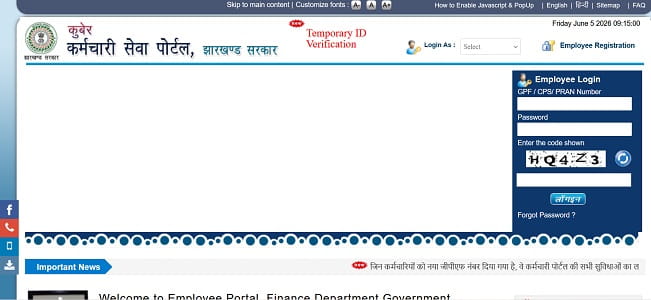
Step 1 — Open Google Chrome and navigate to https://hrms.jharkhand.gov.in/. Click the Employee Login link on the homepage.
Step 2 — Enter your GPF, CPS, or PRAN number in the User ID field. This is the unique number tied to your entire government service record.
Step 3 — Enter your Password. For employees logging in for the very first time after registration, the default password is your Date of Birth in DDMMYYYY format — for example, if your date of birth is 15 August 1985, your default password is 15081985. Change this immediately after your first successful login.
Step 4 — Enter the Captcha code displayed on screen exactly as shown.
Step 5 — Click the Login button. A 6-digit OTP is then sent to your registered email address. Enter this OTP in the field provided to complete the two-step verification.
Step 6 — After OTP verification, your HRMS Jharkhand dashboard opens, displaying your employee profile summary, leave balance, salary information, and quick access to all available modules.
How to Reset HRMS Jharkhand Password
If you forget your password, the reset process is straightforward and does not require contacting HR or IT support.
Visit hrms.jharkhand.gov.in and click the Forgot Password link on the login page. Select Employee from the employee type section. Enter your GPF or CPS number, your registered mobile number, your date of birth, and the captcha code displayed on screen. Click Get OTP. An OTP is sent to your registered mobile number — enter it in the field and follow the remaining instructions to set a new password. Save the new password securely before closing the browser window.
If your registered mobile number has changed since registration, you cannot reset the password independently through the portal. In this case, contact your respective DDO and request them to update your registered mobile number in the system by providing your employee details.
How to Download Salary Slip from HRMS Jharkhand
Downloading salary slips is one of the most frequently used features of the HRMS Jharkhand portal. The salary slip is accepted as valid income proof by banks, financial institutions, and loan providers.
Step 1 — Login to https://hrms.jharkhand.gov.in/ using your GPF or CPS number, password, captcha, and OTP.
Step 2 — On your dashboard, navigate to the Salary Slip or Payroll section.
Step 3 — Select the Month and Year for which you want the salary slip.
Step 4 — Click View or Generate. Your salary slip appears on screen with a complete breakdown of all earnings and deductions for that month.
Step 5 — Click the Download button to save the slip. HRMS Jharkhand allows salary slips to be downloaded in Excel format — click the Excel icon to download the file to your device.
The salary slip shows your name, employee code, department, designation, GPF or PRAN number, basic pay, dearness allowance, house rent allowance, all applicable allowances, all deductions including NPS or GPF contribution and income tax, and the final net salary credited to your bank account.
How to Apply for Leave on HRMS Jharkhand
HRMS Jharkhand provides a completely online leave application process — no paper forms, no physical signatures required.
Step 1 — Login to the portal and navigate to the Leave Management section on your dashboard.
Step 2 — Click Apply Leave and select the leave type — Casual Leave, Earned Leave, Medical Leave, or other applicable categories.
Step 3 — Enter the start date and end date of the leave period, and select your district and office name from the dropdown menus.
Step 4 — Add any required remarks or supporting reason in the provided field.
Step 5 — Click the Apply Leave button to submit your application. The portal sends an SMS confirmation to your registered mobile number confirming that the leave application has been submitted.
Step 6 — Navigate to the leave application page to take a printout of your submitted application for your personal records. Track the real-time approval or rejection status of your application through the portal dashboard.
Key Features of HRMS Jharkhand
HRMS Jharkhand is a multi-function platform covering every significant HR need of Jharkhand state government employees.
Salary Slip and Payroll Access — Monthly and annual salary slips are available for download in Excel format at any time after payroll is processed. The complete earnings and deductions are available for every past month.
e-Service Book — The portal maintains a fully digital service book for each employee covering appointment details, posting and transfer history with order numbers and dates, increment records, and complete promotion history. This replaces the traditional paper service book entirely.
Leave Management — Online application for Casual Leave, Earned Leave, Medical Leave, and other categories with real-time approval tracking and SMS notification on submission.
Annual Confidential Report (ACR) — Employees submit and track their ACR — the annual performance appraisal — entirely through the portal. The complete ACR chain from self-assessment to Accepting Authority is visible and auditable.
Annual Property Return (APR) — Mandatory APR filing for all Jharkhand government employees is done digitally through the HRMS portal. The system tracks submission status and outstanding filings across departments.
Allowance Information — Employees check all applicable allowances linked to their designation, department, and posting location directly through their HRMS dashboard.
Departmental Information — Department-specific information, transfer orders, and official HR notifications are accessible through the portal for employees in all departments.
Profile Management — Employees view and verify their personal details, contact information, posting details, and nominee records through the self-service profile section.
Benefits of HRMS Jharkhand
No Office Visits for Routine Tasks — Before HRMS, employees had to physically visit their DDO office or HR department for salary slips, leave applications, and service book verifications. The portal makes all of these available 24/7 from any internet-connected device.
Complete Transparency in Service Records — Employees see their posting history, promotions, leave balance, and salary records in real time. There is no information gap between what the department holds and what the employee can access.
Faster Leave Approvals — The digital leave workflow routes applications directly to the approving authority online — no paper forms going through inter-office communication. Approval timelines are significantly shorter.
Digital Service Book Eliminates Document Risk — Paper service books are vulnerable to loss, damage, and tampering. The HRMS digital service book is backed up securely and accessible to authorised users at any time, eliminating the risk of lost or misplaced service records.
Unified Workforce Data for Government — The state government gets a real-time, unified view of its entire workforce across all departments — employee strength, vacancy positions, retirement projections, and deployment data — enabling better HR planning and administration.
Income Proof Available Anytime — Salary slips downloaded from the HRMS portal are official government documents accepted by banks for home loans, vehicle loans, and personal loan applications — employees no longer need to wait for HR departments to issue printed salary certificates.
Reduced Paperwork Across Departments — Leave applications, APR filings, ACR submissions, and salary processing are all paperless — reducing administrative overhead significantly at every department and district level.
Common Problems and Solutions
Login fails despite correct credentials — Ensure cookies are enabled in your browser. Clear cache and cookies, then try logging in again using Google Chrome. Verify that your GPF or CPS number is entered without spaces or extra characters.
OTP not received after login — Check that your registered email address is active and accessible. OTP on the HRMS Jharkhand portal is sent to email — not mobile — after the initial login step. Check your spam folder if the OTP email is not visible in the inbox.
Cannot register — mobile number not found — Your mobile number must be pre-registered in the treasury system through your DDO. If the search returns no data when you enter your GPF or CPS number, contact your DDO to update your mobile number and department details in the treasury records first.
Salary slip not available for a month — The salary slip appears on the portal only after payroll processing for that month is complete. If a particular month’s slip is not visible, contact your DDO to confirm that the pay bill for that month has been processed and submitted to the treasury.
Password reset not working — If your registered mobile number or email has changed since registration, the self-service reset will not work. Contact your DDO with a written request to update your registered contact details in the system.
Salary slip showing incorrect amounts — Report any payroll discrepancy to your DDO in writing immediately. The DDO can raise a correction request in the next payroll cycle.
Frequently Asked Questions — HRMS Jharkhand
Q: What is the official URL for HRMS Jharkhand?
A: The official portal is https://hrms.jharkhand.gov.in/. It is also accessible at https://jkuber.jharkhand.gov.in/emp/ for permanent employees and linked from www.finance-jharkhand.gov.in.
Q: What is the login User ID for HRMS Jharkhand?
A: Your GPF (General Provident Fund) number, CPS (Contributory Pension Scheme) number, or PRAN (Permanent Retirement Account Number) serves as your login User ID on the HRMS Jharkhand portal.
Q: What is the default password for new users on HRMS Jharkhand?
A: The default password for first-time login is your Date of Birth in DDMMYYYY format. Change it to a strong personal password immediately after your first login.
Q: What is the Kuber IFMS portal and how is it different from HRMS Jharkhand?
A: The Kuber Integrated Financial Management System portal at jkuber.jharkhand.gov.in/emp/ is the employee-facing salary and HR self-service portal for permanent Jharkhand state government employees. HRMS Jharkhand at hrms.jharkhand.gov.in is the broader Manav Sampada-based HR management system. Both portals provide overlapping services and are interconnected — employees may use either based on the service they need.
Q: Can I download my salary slip in Excel format from HRMS Jharkhand?
A: Yes. Unlike most state HRMS portals that only offer PDF downloads, HRMS Jharkhand allows salary slips to be downloaded in Excel format by clicking the Excel icon on the salary slip page after login.
Q: How do I apply for leave on HRMS Jharkhand?
A: Login to hrms.jharkhand.gov.in → Leave Management → Apply Leave → select leave type, start date, end date, district and office name → click Apply Leave. An SMS confirmation is sent to your registered mobile after submission.
Q: Why is OTP sent to email and not mobile for HRMS Jharkhand login?
A: The HRMS Jharkhand portal sends the 6-digit OTP to your registered email address after you complete the initial login step with your GPF or CPS number, password, and captcha. Ensure your registered email is active and check the spam folder if the OTP is not visible in the inbox.
Q: Can I change my registered mobile number on HRMS Jharkhand?
A: You cannot change your registered mobile number through the portal independently. You must contact your DDO (Drawing and Disbursing Officer) and request the update by providing your employee details. The DDO updates the mobile number in the Kuber IFMS portal on your behalf.
Q: What is the Annual Property Return (APR) on HRMS Jharkhand?
A: APR is a mandatory annual declaration of all movable and immovable property owned by a Jharkhand state government employee. It is filed digitally through the HRMS portal. Failure to file APR within the stipulated deadline can impact promotions and draw departmental action.
Q: Who is eligible to register on HRMS Jharkhand?
A: All permanent and regular Jharkhand state government employees with a valid GPF, CPS, or PRAN number are eligible. The employee’s mobile number must be registered and updated in the treasury system before registration can be completed.
Disclaimer — This article is for informational purposes only. HRMSPedia is not affiliated with the Government of Jharkhand or the Finance Department, Jharkhand. All information is based on publicly available data as of April 2026. Visit https://hrms.jharkhand.gov.in/ for official access and the most current information.