In an era where digital governance is reshaping how state employees interact with their employers, Odisha has firmly positioned itself at the forefront of e-governance innovation through the launch and sustained development of the Human Resource Management System — HRMS Odisha. For the hundreds of thousands of government employees serving across Odisha’s departments, districts, and public institutions, HRMS Odisha has fundamentally transformed the way salary information, service records, leave management, loan applications, and performance appraisals are handled — replacing slow, paper-heavy, office-dependent processes with a clean, accessible, and always-available digital platform. Available at the official portal hrmsodisha.gov.in, this system was developed specifically to give every government employee in the state — from Group A officers to Group D workers — direct, transparent, and real-time access to their employment information from any internet-enabled device, at any time of day, without requiring a visit to their department office.
In 2026, the HRMS Odisha portal has expanded significantly — now covering payslip downloads, pay bill status tracking, property statement filing, Performance Appraisal Reports, transfer applications, loan requests, and an official mobile application for Android users. Here is everything you need to know about HRMS Odisha in 2026.
How to Login to HRMS Odisha
The HRMS Odisha login process is straightforward and designed for ease of use — requiring only an employee’s User ID, registered password, and access to the official portal.
To access HRMS Odisha, follow these steps:
Step 1 — Open a web browser and navigate to the official HRMS Odisha portal at hrmsodisha.gov.in or the alternative portal hrmsorissa.gov.in.
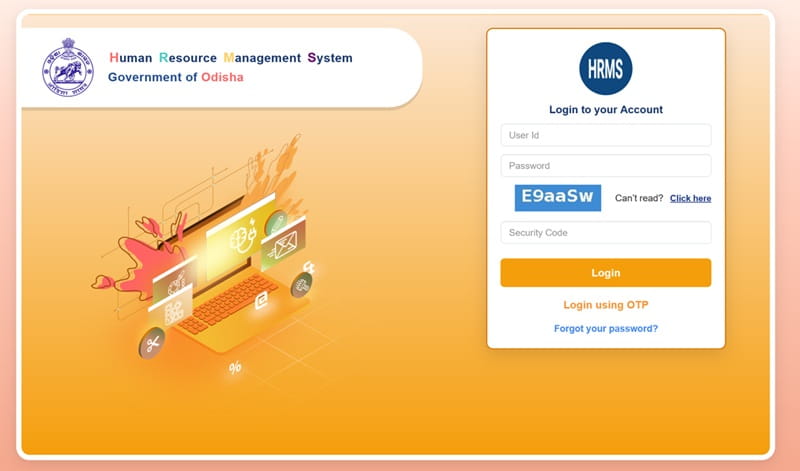
Step 2 — On the homepage, locate and click the “Personal Login” or “HRMS Login” button prominently displayed in the navigation area.
Step 3 — Enter your User ID (typically your employee code assigned by the department) in the designated field.
Step 4 — Enter your Password in the password field. If you are logging in for the first time, the system will prompt you to set a new password.
Step 5 — Complete any CAPTCHA verification if prompted, then click the “Login” button.
Step 6 — The system will direct you to your “My Profile” page — the personalised employee dashboard from which all HRMS services are accessible.
Forgot Password? — On the login page, click the “Forgot Password” link. Enter your registered mobile number and date of birth. The system will send an OTP to your registered mobile number for identity verification, after which you can set a new password. Employees are advised to keep their registered mobile number updated to avoid access issues.
How to Download Payslip on HRMS Odisha
Downloading a monthly payslip from HRMS Odisha is a simple, step-by-step process that takes only a few minutes once logged in — and the downloaded PDF is officially recognised for bank loan and income tax purposes.
Once you have successfully logged in to the HRMS Odisha portal, follow these steps to download your payslip:
Step 1 — From your personal dashboard, navigate to the “My Reports” section in the main menu.
Step 2 — Click on “Monthly Payslip” from the available report options.
Step 3 — A payslip selection page will open — use the month and year dropdown menus to select the specific month for which you want your payslip.
Step 4 — Click the “View” button to load your payslip on the screen. The payslip will display your complete salary details including gross salary, all deductions, EPF contribution, ESI deduction, and net salary paid.
Step 5 — Click the “Download” or “Print” button to save the payslip as a PDF file to your device. The process takes a few seconds and produces a clean, formatted PDF document.
The downloaded payslip contains the following key information — employee name, employee code, designation, department, posting location, number of working days, leave details, gross salary components, all applicable deductions including EPF and ESI, and the final net salary credited. This document is officially recognised for bank loan applications, income tax filing, and employment verification purposes.
Features of HRMS Odisha
HRMS Odisha is far more than a payslip portal — it is a comprehensive HR management ecosystem covering the full employment lifecycle of every Odisha government employee.
Monthly Payslip Download — The most-used feature of HRMS Odisha — employees can download PDF payslips for any historical month, maintain a personal archive of salary records, and use them for official financial and employment purposes.
Pay Bill Status Tracking — The HRMS Odisha Pay Bill Status feature allows employees to check in real time whether their monthly salary bill has been prepared and forwarded to the treasury for payment — eliminating the anxiety and office visits previously required to confirm salary processing status.
E-Service Book — The electronic service book maintains a complete digitised record of every employee’s service history — posting history, promotions, transfers, service verification details, and qualification records — all accessible online without requiring physical files.
Performance Appraisal Report (PAR) — The PAR HRMS Odisha module digitises the entire annual performance appraisal process — employees submit their self-assessment online, reporting officers review and grade them digitally, and the complete PAR record is maintained within the system for career advancement purposes.
Leave Management — Employees can apply for various types of leave — earned leave, casual leave, medical leave, and others — directly through the portal. Reporting officers can approve or reject applications online, creating a paperless leave management workflow.
Loan Request Submission — HRMS Odisha allows employees to submit loan applications — including house building advance, vehicle advance, and personal computer advance — directly through the portal, with tracking capability for application status.
Property Statement Filing — All Group A, B, C, and D government employees are required to file their annual property statement through the HRMS portal. For the 2025 cycle, the government extended the deadline to March 31, 2026. Failure to submit on time can result in disciplinary action or salary withholding.
Transfer Module — The dedicated transfer.hrmsodisha.gov.in portal allows employees in departments that have enabled the online transfer module to apply for transfers, track application status, and receive orders digitally.
Mobile Application — The official HRMS Odisha mobile app is available for download on the Google Play Store — allowing employees to access payslips, apply for leave, track pay bill status, and manage their profile directly from a smartphone.
Benefits of HRMS Odisha
HRMS Odisha delivers tangible, practical benefits to both individual employees and the broader state government administration — making it one of Odisha’s most impactful e-governance initiatives.
24-Hour Anytime Access — Government employees can access their salary information, leave balance, and service records from anywhere at any time — eliminating the need for office visits or dependence on departmental accounts staff for basic salary queries.
Transparency in Salary Processing — HRMS provides employees with complete visibility into every component of their salary — gross earnings, individual allowances, and every deduction — eliminating disputes and misunderstandings about salary calculations.
Document Availability for Financial Applications — Payslips downloaded from HRMS Odisha are officially accepted by banks for loan processing — making it significantly easier for employees to apply for home loans, vehicle loans, and personal loans without requiring attested physical salary certificates from their offices.
Reduced Administrative Burden — Departments no longer need to manually distribute physical salary slips, process paper leave applications, or maintain physical service books — the digital infrastructure handles all of this automatically, freeing administrative staff for more productive work.
Income Tax and Audit Compliance — Employees can maintain a complete digital record of all monthly payslips — simplifying annual income tax filing and providing immediately accessible documentation for audit and verification purposes.
Fair and Timely PAR Processing — The online Performance Appraisal Report system ensures that every employee’s contribution is recorded fairly, reviewed on schedule, and accessible for promotion and career advancement decisions without the delays that plagued paper-based PAR workflows.
Remote Accessibility — For employees posted in remote districts and tribal areas where physical access to department headquarters is genuinely difficult, HRMS Odisha’s digital platform is a transformative improvement — bringing all HR services within reach of an internet connection.
FAQs — HRMS Odisha
Q1. What is the official website of HRMS Odisha?
The official portals are hrmsodisha.gov.in and the alternative address hrmsorissa.gov.in — both provide access to the full HRMS service suite for registered Odisha government employees.
Q2. How do I reset my HRMS Odisha password?
Click “Forgot Password” on the login page, enter your registered mobile number and date of birth, receive an OTP via SMS, and use it to set a new password.
Q3. Is the HRMS Odisha payslip accepted for bank loans?
Yes — the HRMS Odisha payslip PDF is officially recognised by banks for loan processing, income tax filing, and employment verification purposes.
Q4. Is there an HRMS Odisha mobile app?
Yes — the official HRMS Odisha mobile app is available for free download on the Google Play Store, enabling payslip access, leave applications, and pay bill status tracking on smartphones.
Q5. What is the HRMS Odisha property statement deadline for 2026?
The property statement for the 2025 period has been extended to March 31, 2026 — mandatory for all Group A, B, C, and D employees. Non-submission can result in disciplinary action.