Kerala State Financial Enterprises Limited, popularly known as KSFE, is one of Kerala’s most trusted and iconic public sector institutions. Founded on 6 November 1969 by the Government of Kerala, KSFE has grown from a modest 10-branch organisation with 45 employees into a financial powerhouse with over 680 branches, 16 regional offices, one Digital Business Centre in Thiruvananthapuram, and a workforce of more than 8,200 employees serving Keralites across the state and globally. Managing this large, distributed workforce efficiently requires a robust digital HR platform. That platform is HRMS KSFE — accessible at https://hrms.ksfe.com/hrapps/login — a centralised Human Resource Management System built exclusively for KSFE employees.
What Is HRMS KSFE?
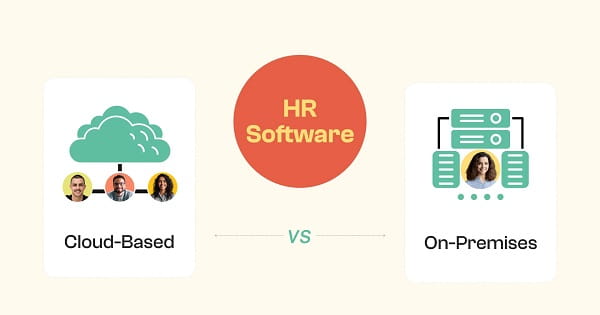
HRMS KSFE is the official Human Resource Management System of Kerala State Financial Enterprises Limited. It is an internal, cloud-based digital platform powered by Ospyn Technologies Pvt. Ltd — a Kerala-based technology company — built to manage the complete HR lifecycle for KSFE’s workforce across all its branches, regional offices, and the corporate headquarters at Thrissur.
The system centralises all employee-related data and functions — attendance tracking, salary processing and payslip generation, leave management, performance appraisal, incentive declarations, tax statements, holiday calendar access, and employee shift management — into a single, secure login interface. Every KSFE employee, regardless of their branch posting or role, uses the same HRMS portal for all day-to-day HR activities.
One important distinction to understand clearly: HRMS KSFE at hrms.ksfe.com is strictly for KSFE employees. It is not accessible to customers or the general public. Customers of KSFE who need to manage their chitty accounts, deposits, or loans use the separate customer portal at online.ksfe.com or the KSFE Power mobile app. These are entirely different platforms from the employee HRMS.
About KSFE — The Organisation Behind HRMS
Understanding HRMS KSFE fully requires knowing what KSFE does as an organisation. KSFE is a Miscellaneous Non-Banking Company (MNBC) that is 100% owned by the Government of Kerala. Its primary product is the Chitty — a chit fund scheme that uniquely combines the benefits of both savings and advance credit. KSFE conducts chitties fully governed by the provisions of the Central Chit Fund Act 1982, with monthly instalments ranging from Rs. 1,000 to Rs. 5,00,000 across durations of 30, 40, 50, 60, and 100 months.
Beyond chitties, KSFE offers gold loans, personal loans, home loans, fixed deposit loans, passbook loans, and chitty substitution plans. With an annual turnover exceeding Rs. 1,01,000 crore, KSFE is consistently one of the most profitable public sector undertakings of the Kerala government. A particularly notable aspect of KSFE’s philosophy is that all funds mobilised through chitties and deposits are advanced entirely to the public within Kerala — unlike banks and financial institutions that channel Kerala deposits into advances elsewhere.
KSFE employees across all 680+ branches are directly involved in managing chitty operations, loans, deposits, customer data, and scheme administration — all of which are supported by the HRMS platform.
How to Login to HRMS KSFE
Logging into HRMS KSFE requires login credentials that are provided exclusively by the KSFE Admin department. There is no self-registration available on this portal — every employee receives their username and password directly from the Admin Head of their branch or regional office before their first login.
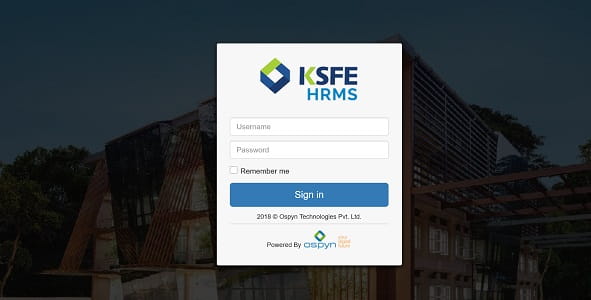
Step 1 — Open Google Chrome or any modern browser and navigate to the official HRMS KSFE login page at https://hrms.ksfe.com/hrapps/login.
Step 2 — On the login page, enter your Username in the designated field. Your username is assigned by the KSFE Admin department and is unique to your employee identity within the organisation.
Step 3 — Enter your Password in the password field. This is the initial password provided by your Admin department. Passwords are case-sensitive — ensure Caps Lock is turned off before entering your credentials.
Step 4 — Click the Sign In button to access your personalised HRMS dashboard. After successful login, your dashboard displays all available modules — salary information, attendance records, leave applications, performance data, holiday calendar, and other HR services based on your role and access level.
One important security note about HRMS KSFE — password changes and resets are managed exclusively by the KSFE Admin department. Unlike most HRMS portals that provide a self-service Forgot Password option, HRMS KSFE requires employees to contact their respective Admin Head directly if they forget or need to change their password. This is a fully manual process handled internally — employees cannot independently reset their password through the portal. Always save your login credentials securely and contact your Admin Head promptly if access is lost.
Being a cloud-based platform, HRMS KSFE is accessible from office systems as well as remotely — employees can login from any internet-connected device when required.
Key Features of HRMS KSFE
HRMS KSFE is a comprehensive HR management platform covering every significant function of employee administration for KSFE’s large and distributed workforce.
Payroll Processing and Salary Slip Generation — The payroll module automates the calculation of employee salaries, taking into account all applicable components including basic pay, allowances, incentives, and all statutory deductions. Salary slips are generated and made available for each employee directly through the portal. Employees view and download their monthly salary slips without contacting their branch manager or HR department. The automation of payroll processing significantly reduces calculation errors and ensures salaries are processed on time across all branches.
Leave Management — Employees apply for leave directly through the HRMS portal. All leave categories available under KSFE’s service rules are accessible through the system. Leave applications are routed digitally to the relevant approving authority — branch manager or reporting officer — for approval or rejection. Employees track the real-time status of their leave applications through their dashboard and check their available leave balance for each category before submitting.
Attendance Tracking and Shift Management — The HRMS records daily attendance for each employee — entry time, exit time, break time, and total hours worked. This attendance data feeds directly into payroll processing, ensuring accuracy in salary calculations based on actual working days. The system also manages employee shift schedules across branches — assigning, updating, and tracking shifts for employees working in different time slots or rotational schedules. This feature is particularly relevant for KSFE branch staff managing customer-facing operations throughout the day.
Performance Management and Appraisal — KSFE HRMS captures key performance indicators for each employee and uses this data to support periodic performance reviews and appraisals. The system records the appraisal amount for each employee — visible through the portal — enabling transparent communication of performance outcomes. Managers use the system to assess and document employee performance consistently across all branches.
Holiday Calendar — The annual holiday calendar for KSFE is accessible through the HRMS dashboard. Employees view all bank holidays and KSFE-specific holidays applicable to their posting, enabling better leave planning throughout the year without needing to refer to separate circulars or physical notice boards.
Incentive Declaration — KSFE employees declare and view their incentive details through the HRMS portal. The incentive module connects performance outcomes with financial rewards, providing transparency in how individual performance translates into incentive payouts.
Tax Statements and Form 16 — Annual income tax statements and TDS certificates are accessible through the HRMS, simplifying income tax return filing for employees. Employees download their tax documents directly from the portal instead of requesting them from the accounts department.
Advance Salary Requests — KSFE HRMS allows employees to request advance salary through the portal — enabling employees to access a portion of their monthly salary before the actual salary date in cases of financial need.
Employee Self-Service — Beyond HR documents, the HRMS provides employees with tools to manage their work portfolio — updating personal information, viewing posting details, and accessing scheme-related information connected to KSFE’s business operations. Employees with operational access can also update chit details, enter customer information, and update loan scheme data through their limited role-based portal access, supporting daily branch business activities.
Background and Service Record Tracking — The HR system maintains employee background information and complete service records — work experience details, appointment history, and posting records — accessible to authorised HR administrators for workforce management and compliance purposes.
HRMS KSFE vs KSFE Power App vs KSFE Online Portal — Key Differences
KSFE operates three distinct digital platforms, and understanding which serves which purpose avoids unnecessary confusion.
HRMS KSFE at hrms.ksfe.com is strictly for employees — managing payroll, leave, attendance, performance, and all internal HR functions. Only KSFE staff with credentials issued by the Admin department can access it.
KSFE Power App is the official mobile application for customers — enabling chitty monthly remittance management, investment monitoring, loan account access, and real-time chitty updates. This is a customer-facing app with no connection to the employee HRMS.
KSFE Online Portal at online.ksfe.com is the web-based customer service portal where KSFE customers manage their chitty accounts, deposits, loan accounts, and make online payments. Again, entirely separate from the employee HRMS.
The fundamental rule is straightforward: if you are a KSFE employee, use hrms.ksfe.com. If you are a KSFE customer, use online.ksfe.com or the KSFE Power app.
Benefits of HRMS KSFE
Centralised, Paperless HR Operations Across 680+ Branches — KSFE’s branch network spans every district of Kerala. Without a centralised digital HRMS, managing HR data, payroll, and leave for 8,200+ employees across hundreds of locations would require enormous paper-based coordination. HRMS KSFE eliminates this entirely by providing a single platform accessible from every branch.
Accurate and Timely Salary Processing — Payroll automation through Ospyn Technologies’ platform ensures that every employee across all branches receives accurate salary calculations without manual computation errors. The system accounts for attendance, leave, incentives, and deductions simultaneously — significantly reducing payroll discrepancies and the time required for monthly salary processing.
Transparent Access to Personal HR Data — Every KSFE employee can directly view their own salary slips, attendance records, leave balance, incentive amounts, and performance appraisal outcomes through their HRMS dashboard. This transparency reduces the number of queries routed to HR departments and branch managers, allowing them to focus on core business functions.
Cloud-Based Remote Accessibility — Being a cloud-based system, HRMS KSFE is accessible from any internet-connected device. Branch employees who need to check salary information, submit leave requests, or view their attendance records do not need to wait until they are at their primary office terminal.
Integrated Business Operations Support — KSFE HRMS uniquely connects employee HR functions with KSFE’s business operations. Employees with operational access manage chit updates, loan scheme entries, customer information, and deposit scheme data through the same portal — making HRMS KSFE not just an HR system but an integrated operations support platform for KSFE’s front-line staff.
Consistent HR Standards Across All Levels — Whether an employee is posted at the corporate head office in Thrissur, a regional office in Kozhikode, or a branch in a smaller town, the HRMS provides the same service quality and access to HR information. There is no disparity in HR service delivery based on location.
Shift Management Efficiency — For a financial services organisation operating across hundreds of branches with varying customer footfall, managing employee shift schedules efficiently is critical. The HRMS shift management module ensures that branch staffing is tracked and documented systematically, reducing scheduling conflicts and ensuring appropriate staffing levels at each location.
Common Problems and Solutions on HRMS KSFE
Login failure despite correct credentials — The most common reason is Caps Lock being on while entering the password. HRMS KSFE passwords are case-sensitive. Turn off Caps Lock, clear browser cache, and attempt login again in Google Chrome. If the issue persists, confirm your username with your branch Admin.
Forgot password or cannot access account — Unlike most HRMS portals, HRMS KSFE does not have a self-service password reset option. Password changes and resets are handled exclusively by the KSFE Admin department. Contact your Admin Head at your branch or regional office immediately — provide your employee details and request a manual password reset.
Certain modules or features not visible — Some HRMS modules require role-specific access or higher-level authorisation. Not all features are visible to all employees — access levels depend on your designation and operational responsibilities. If you need access to a specific module, contact your branch HR administrator or Admin Head.
Salary slip not reflecting correctly — If your salary slip shows incorrect amounts, report the discrepancy in writing to your branch manager and HR department immediately. Payroll corrections are processed in the subsequent cycle.
Attendance records showing errors — Contact your branch HR or Admin immediately to flag any attendance discrepancies. Incorrect attendance records can affect both leave calculations and salary processing, so early reporting is essential.
Frequently Asked Questions — HRMS KSFE
Q: What is HRMS KSFE?
A: HRMS KSFE is the official Human Resource Management System of Kerala State Financial Enterprises Limited — a cloud-based, internal employee portal at hrms.ksfe.com/hrapps/login powered by Ospyn Technologies Pvt. Ltd. It manages payroll, attendance, leave, performance appraisal, salary slips, incentives, and all HR self-service functions exclusively for KSFE employees.
Q: Who can use HRMS KSFE?
A: Only employees of Kerala State Financial Enterprises Limited. Customers of KSFE cannot access the HRMS portal. Customers must use online.ksfe.com or the KSFE Power mobile app for their financial service needs.
Q: How do I get my HRMS KSFE login credentials?
A: Login credentials — username and password — are issued exclusively by the KSFE Admin department. There is no self-registration option. Contact the Admin Head at your branch or regional office to receive your credentials before your first login.
Q: How do I reset my HRMS KSFE password if I forget it?
A: Password resets on HRMS KSFE are not self-service. Contact your respective Admin Head at your branch or regional office. This is a manual process — your Admin will reset the password on your behalf after verifying your identity.
Q: What is Ospyn Technologies?
A: Ospyn Technologies Pvt. Ltd is a Kerala-based technology company that developed and powers the HRMS software platform used by KSFE. Ospyn specialises in enterprise HR and financial technology solutions for corporate and public sector clients.
Q: What is KSFE and where is it headquartered?
A: Kerala State Financial Enterprises Limited (KSFE) is a 100% Kerala Government-owned financial institution founded on 6 November 1969. Its headquarters is located in Thrissur, Kerala — the hub of chitty business in the state. KSFE operates 680+ branches and 16 regional offices across Kerala with over 8,200 employees.
Q: What is the KSFE Power App — is it the same as HRMS?
A: No. The KSFE Power App is a customer-facing mobile application for managing chitty accounts, loans, deposits, and monthly remittances. It has no connection to the HRMS KSFE employee portal. HRMS is for employees only — the Power App is for customers.
Q: Can I access HRMS KSFE from my personal phone or home computer?
A: Yes. HRMS KSFE is a cloud-based platform, meaning it can be accessed from any internet-connected device — office computer, personal laptop, or smartphone — using your KSFE Admin-issued login credentials through the URL hrms.ksfe.com/hrapps/login.
Q: What are the main financial products of KSFE linked to employee operations?
A: KSFE’s primary products are chitties (chit funds), gold loans, personal loans, home loans, fixed deposit loans, passbook loans, and chitty substitution plans. KSFE employees manage chitty operations, customer data, loan scheme updates, and deposit scheme entries — activities that are supported through their role-based HRMS portal access.
Disclaimer — This article is for informational purposes only. HRMSPedia is not affiliated with Kerala State Financial Enterprises Limited (KSFE) or Ospyn Technologies Pvt. Ltd. All information is based on publicly available data as of April 2026. Visit https://hrms.ksfe.com/hrapps/login for official employee access. Customers of KSFE should visit ksfe.com or online.ksfe.com for their financial service needs.