HRMS Bihar is the official Human Resource Management System launched by the Government of Bihar for state government employees. The portal helps employees access salary slips, service records, leave details, payroll information, and other employee-related services online. The official website of the portal is https://hrms.bihar.gov.in/
Earlier, government employees had to visit department offices for salary slips, leave records, or service-related information. However, the HRMS Bihar portal has simplified the entire process digitally. Employees can now log in from their mobile or computer and access important services anytime.
The portal is widely used by Bihar government employees, teachers, departmental staff, and payroll officials. It improves transparency, reduces paperwork, and saves time for both employees and departments. With this Bihar HRMS portal employees can use the system for salary slip downloads, service book access, leave management, and payroll-related services.
Official HRMS Bihar Government Portal
Here are the important official links related to HRMS Bihar:
- Official Website: https://hrms.bihar.gov.in/
- Official App: https://play.google.com/store/apps/details?id=com.humanitics.hrms&hl=en_US
Always use the official government website to avoid fake portals or scams.
Who Can Use HRMS Bihar?
The portal is mainly designed for:
- Bihar Government employees
- Bihar Education Department teachers
- Department officials
- Payroll and HR staff
- Authorized government personnel
Each employee receives login credentials through their department or DDO (Drawing and Disbursing Officer).
HRMS Bihar Login Process
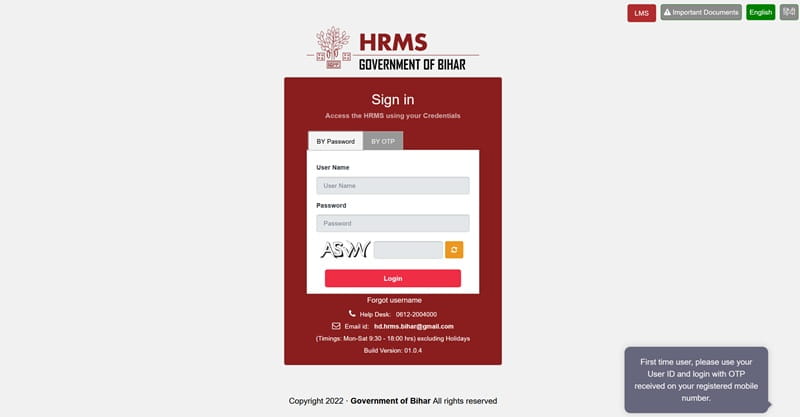
Employees can easily log in to the portal by following these steps:
Steps to Login
- Visit the official portal: https://hrms.bihar.gov.in/
- Enter your Employee ID / Username
- Enter your Password
- Fill in the Captcha Code
- Click on the Login button
- After successful login, your employee dashboard will open
From the dashboard, employees can access salary slips, payroll details, leave services, and service book records.
HRMS Bihar Registration Process
New employees cannot directly self-register on the portal. Registration is generally completed through department authorities or DDO offices.
Registration Steps
- Employee joins the department
- Department or DDO uploads employee details
- Employee information is verified
- Login credentials are generated
- User ID and temporary password are shared with the employee
Employees may need the following details:
- Employee ID
- Aadhaar-linked mobile number
- Appointment details
- Department information
- Basic identity documents
According to portal guides, self-registration is not openly available for normal users. Registration is controlled by official HR authorities.
How to Download HRMS Bihar Salary Slip
The salary slip feature is one of the most commonly used services on the portal. Employees can download monthly payslips in PDF format.
Steps to Download Salary Slip
- Login to the HRMS Bihar portal
- Open the Payroll / Salary section
- Click on Salary Slip
- Select the Month and Financial Year
- Click on View Salary Slip
- The salary slip will appear on the screen
- Click on Download PDF or Print option
The downloaded payslip usually contains:
- Employee Name
- Employee ID
- Department Name
- Basic Pay
- DA and HRA
- Deductions
- Net Salary
Employees can use the salary slip for loans, income tax filing, and official purposes.
Employee Service Book on HRMS Bihar
Another useful feature is the online service book facility. Employees can access employment records digitally without visiting offices.
The service book may include:
- Joining details
- Promotions
- Salary increments
- Leave records
- Transfer details
- Department history
Employees should regularly verify their records and report any errors to their DDO or department authority.
HRMS Bihar Employee to Cadre Mapping
According to the HRMS Bihar user manual, the portal also provides a Cadre Employee Mapping system for payroll officials and authorized users.
The process involves:
- Logging into the HRMS portal
- Selecting “Cadre/Post to Employee Mapping”
- Choosing cadre and post
- Searching employee details
- Adding employees to the selected cadre
- Saving and forwarding the request to checker/approver
The manual explains that the process is mainly used by payroll makers, checkers, and approvers within the HRMS system.
Common Login Problems and Solutions
Employees may sometimes face login-related issues. Here are common problems and fixes:
1. Forgot Password
- Use the “Forgot Password” option
- Reset using registered mobile number or OTP
2. Incorrect Employee ID
- Verify Employee ID carefully
- Contact department if needed
3. Portal Not Opening
- Try another browser
- Clear browser cache
4. Salary Slip Not Showing
- Check payroll update timing
- Try again later
5. Account Locked
- Contact department admin or DDO
Benefits of HRMS Bihar Portal
The HRMS Bihar portal offers many advantages:
- Easy online salary slip access
- Reduced paperwork
- Faster payroll management
- Transparent employee records
- Digital service book facility
- Centralized HR system
- Time-saving process
The portal has improved employee management efficiency across Bihar Government departments.
HRMS Bihar Helpdesk Details
Employees facing issues can contact HRMS Bihar support.
Helpdesk Information
- Helpline Number: 0612-2217601
The HRMS Bihar user manual also mentions another support contact:
- Helpdesk Number: 0612 200 4000
- Email: hd.hrms.bihar@gmail.com
Conclusion
HRMS Bihar is an important digital platform developed for Bihar Government employees. Through the official portal, employees can log in, access salary slips, check service records, and manage payroll-related services easily.
The portal has reduced manual work and improved transparency in employee management. By following the correct login and salary slip download process, employees can use the system smoothly and efficiently.
FAQs on HRMS Bihar
Q. What is the official website of HRMS Bihar?
The official website is https://hrms.bihar.gov.in/
Q. Who can use HRMS Bihar?
Bihar Government employees and authorized department officials can use the portal.
Q. How can I login to HRMS Bihar?
Visit the portal and enter Employee ID, password, and captcha code.
Q. Can employees self-register on HRMS Bihar?
No, registration is generally done through DDO or department authorities.
Q. How to download HRMS Bihar salary slip?
Login → Payroll Section → Salary Slip → Select month → Download PDF.
Q. What details are available on salary slip?
Basic pay, deductions, allowances, and net salary details are available.
Q. What should I do if I forget my password?
Use the Forgot Password option or contact your department.
Q. Is HRMS Bihar available on mobile?
Yes, the portal can be accessed through mobile browsers.
Q. What is Employee to Cadre Mapping?
It is a feature used for mapping employees with cadre/posts in HRMS Bihar.
Q. How can I contact HRMS Bihar support?
You can contact the HRMS helpdesk through phone or email support.