Indian Railways is not merely a transport network — it is one of the world’s largest employers, operating across an extraordinary web of zones, divisions, workshops, production units, and administrative departments, with a workforce exceeding one million employees. Managing the human resource needs of an organisation of this scale — tracking salaries, leaves, transfers, promotions, service records, provident fund accounts, retirement benefits, and performance appraisals for over a million individuals simultaneously — is a challenge that no paper-based system could sustainably address in 2026. The HRMS Indian Railways portal — accessible at the official URL hrms.indianrail.gov.in/HRMS — is the digital answer to that challenge. Developed and maintained by CRIS (Centre for Railway Information Systems), this comprehensive web-based Human Resource Management System was launched to give every railway employee direct, secure, and 24-hour access to their complete HR profile — from salary slips and PF balances through leave applications, service records, and retirement processing.
Whether you are a serving railway employee at a field posting, a retired pensioner managing your benefits, or a new recruit navigating your first payslip, HRMS Railway is your single digital gateway to everything HR. Here is your complete and updated guide for 2026.
How to Login to HRMS Railway
The HRMS Railway login process uses a three-layer security system — HRMS ID, password, and mobile OTP — ensuring that only verified employees access their personal HR data.
For First-Time Users:
Step 1 — Visit the official HRMS portal at hrms.indianrail.gov.in/HRMS on any browser.
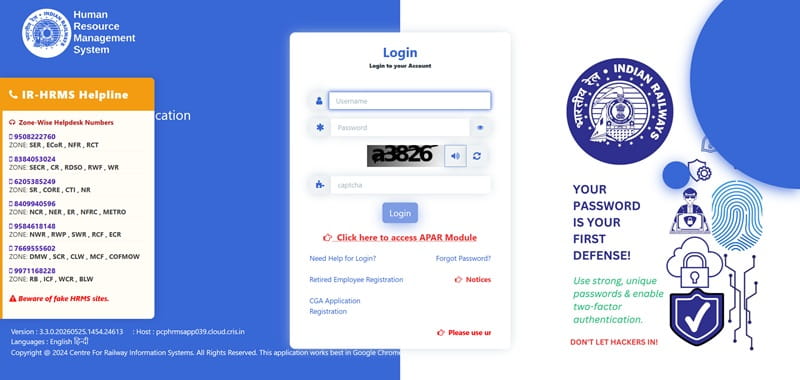
Step 2 — On the login page, click “Register User” or select the “Need Help for Login?” option.
Step 3 — Enter your IPAS ID / PF Number (your unique employee identification number) in the designated field.
Step 4 — Enter your 10-digit registered mobile number and click “Send OTP.”
Step 5 — Enter the OTP received on your mobile to verify your identity. Upon successful verification, the system generates your HRMS login credentials.
For Returning Users:
Step 1 — Go to hrms.indianrail.gov.in/HRMS and enter your HRMS ID or IPAS ID.
Step 2 — Enter your password and complete the CAPTCHA verification.
Step 3 — Click “Login.” An OTP will be sent to your registered mobile number.
Step 4 — Enter the OTP for Verify OTP confirmation. Your HRMS dashboard will open immediately after successful verification.
Forgot Password? — On the login page, click “Forgot Password” or “Need Help for Login?”, enter your IPAS/PF number and registered mobile number, receive an OTP, and follow the prompts to set a new password. If your registered mobile number has changed, contact your zonal HR or establishment office to update it before resetting.
How to Download Payslip on HRMS Railway
Downloading monthly salary slips from HRMS Railway is a quick, digital process — producing an official PDF payslip accepted for bank loans, income tax filing, and financial verification.
Once logged in to the HRMS Railway portal, follow these steps:
Step 1 — From your employee dashboard, navigate to the “Salary Slip” or “Payslip” section in the main menu.
Step 2 — Select the month and year of the payslip you wish to download from the dropdown menu.
Step 3 — Click “View” to display the payslip on your screen. The payslip shows your complete salary details — basic pay, grade pay, all applicable allowances, deductions including GPF/NPS contributions, income tax deductions, and the final net pay credited.
Step 4 — Click “Download” or “Print” to save the payslip as a PDF document.
For employees who prefer the dedicated payslip portal, aims.indianrailways.gov.in/ress provides an alternative access route for salary slip downloads. Payslips are available for all historical months and are officially recognised documents for bank loan applications, income tax filing, and employment verification.
How to Apply for PF Withdrawal on HRMS Railway
PF withdrawal — both temporary advances and final settlements — can be applied for completely online through the HRMS portal, eliminating the need for physical form submission and departmental approval visits.
Step 1 — Log in to hrms.indianrail.gov.in/HRMS with your HRMS ID, password, and OTP.
Step 2 — From the dashboard, click on “Loans and Advances” in the main navigation menu.
Step 3 — Select “My PF Applications” from the available options.
Step 4 — Click “New Application” to initiate a fresh PF withdrawal request.
Step 5 — Scroll down to the “PF Loan Application Details” section and fill in all required information accurately — including the withdrawal amount, purpose, and account details.
Step 6 — Select the withdrawal type — “Temporary” (advance against PF balance) or “Final” (complete PF withdrawal at retirement or resignation).
Step 7 — Submit the application. The system routes it to the appropriate approving authority automatically — the employee can track the application status in real time through the same “My PF Applications” section.
Railway employees can also view their current PF balance within the HRMS portal before initiating a withdrawal application — giving them complete visibility into their provident fund account without requiring any manual inquiry.
Key Features of HRMS Railway
HRMS Railway’s module-based architecture covers every dimension of a railway employee’s HR lifecycle — from the day of joining through active service years to full retirement settlement.
Employee Self Service (ESS) — The foundational module allowing employees to view and update personal information including contact details, home address, emergency contacts, family details, and nomination records — all without requiring departmental intervention.
Salary Slip and Pay Bill — Monthly payslip generation, viewing, and PDF download for all historical months. Pay bill status tracking allows employees to verify in real time whether their monthly salary bill has been processed and sent to the treasury.
Leave Management — Employees can apply for all categories of leave — Earned Leave, Half Pay Leave, Commuted Leave, Leave Not Due, Extra Ordinary Leave, Casual Leave, and others — directly through the portal. Leave balances are visible in real time, and reporting officers approve or reject applications digitally.
PF and Loan Management — View GPF/NPS balance, apply for PF advance (temporary and final withdrawal), track loan and advance applications, and monitor repayment schedules — all within a single dedicated module.
Service Record and E-Service Book — A complete digitised service history is maintained — covering all postings, transfers, promotions, increments, awards, training programmes, and service verifications. The E-Service Book replaces physical service registers that were prone to damage and loss.
APAR (Annual Performance Appraisal Report) — The PAR/APAR module handles the entire annual appraisal cycle digitally — employee self-appraisal submission, reporting officer review and grading, accepting officer endorsement, and final record maintenance — with complete tracking of APAR status throughout the workflow.
NOC Applications — Employees can apply for No Objection Certificates for purposes including passport applications, external employment, and other official requirements directly through the HRMS portal.
ePass Module — Railway employees and their eligible family members can apply for railway travel passes (ePasses) through the portal — replacing the physical pass system that required office visits and manual distribution.
Retirement Processing — Retiring employees can initiate and track their entire retirement settlement online — submitting applications for GPF final withdrawal, pension processing, gratuity, and encashment of earned leave without requiring the mountain of physical paperwork that previously characterised railway retirement procedures.
Attendance Management — Departmental clerks can regularise attendance records and correct missed punches through the HRMS portal — maintaining accurate attendance data that feeds directly into payroll calculations.
Mobile Application — The HRMS Employee Mobile Application developed by CRIS is available on the Google Play Store — providing on-the-go access to payslips, leave applications, PF balance, APAR status, and NOC requests from any Android smartphone.
Benefits of HRMS Railway
HRMS Railway delivers transformational benefits across every level of the railway workforce — from individual employees to divisional administrators and the Railway Board itself.
Elimination of Office Visits — The most immediately felt benefit across the workforce. Salary slips, leave applications, PF inquiries, and service records are all accessible from any device at any time — eliminating the repeated office visits that consumed significant time and energy for railway employees, particularly those posted in remote divisions.
Transparency in Salary and Deductions — Every component of a railway employee’s monthly salary — basic pay, allowances, deductions, and net pay — is visible with complete clarity. Disputes about salary calculations are resolved by the employee reviewing their own payslip data without departmental intermediaries.
24-Hour Accessibility — The HRMS portal is available round the clock — with a maintenance window typically from 10:00 PM to 11:59 PM — allowing employees across all time zones and shift patterns of the railway’s 24-hour operational structure to access their HR data at any convenient time.
Faster PF and Loan Processing — Online PF withdrawal and advance applications are processed significantly faster than paper-based requests — with digital routing to approving authorities and real-time status tracking eliminating the anxiety of unknown processing timelines.
Paperless Service Record Maintenance — The E-Service Book digitally archives every career event — protecting decades of service history from the physical damage, misplacement, or unauthorised alteration that plagued paper service registers.
Streamlined Retirement Settlement — For retiring employees, HRMS makes one of life’s most bureaucratically burdensome processes genuinely manageable — submitting all retirement-related applications digitally and tracking their status without depending on departmental clerks for updates.
FAQs — HRMS Railway
Q1. What is the official URL for HRMS Railway login?
The official and only authenticated portal is hrms.indianrail.gov.in/HRMS — all employees are advised to use this URL exclusively and avoid unofficial third-party links claiming HRMS access.
Q2. What credentials are needed to log in to HRMS Railway?
Login requires your HRMS ID or IPAS/PF Number, password, and a mobile OTP sent to your registered 10-digit mobile number — a three-layer verification ensuring account security.
Q3. How do I apply for PF withdrawal through HRMS Railway?
Log in, navigate to “Loans and Advances” → “My PF Applications” → “New Application”, fill the PF application details, select Temporary or Final withdrawal type, and submit for digital routing to the approving authority.
Q4. Is there an HRMS Railway mobile app?
Yes — the HRMS Employee Mobile Application developed by CRIS is available on the Google Play Store for free download, providing mobile access to payslips, leave, PF balance, and other HR services.
Q5. Can retired railway employees access HRMS?
Yes — retired employees can register on the HRMS portal using their PF number and mobile number to access their retirement-related documents, pension processing status, and historical service records.