The Food Corporation of India (FCI) is one of the country’s most strategically important government organisations — entrusted with the procurement, storage, distribution, and movement of food grains across India’s vast and complex supply chain. Managing the human resource needs of an organisation operating at this scale and geographic spread — with employees deployed from central offices in New Delhi to district depots in the country’s most remote regions — demands a digital HR platform that is as robust and accessible as the organisation itself.
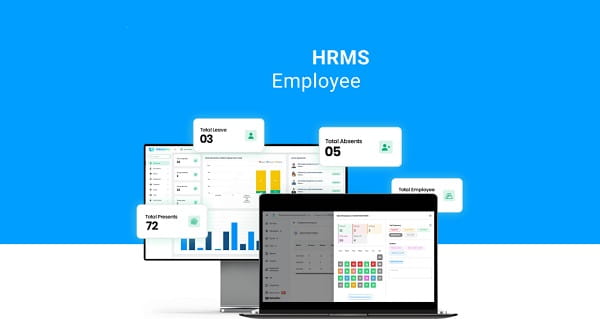
FCI HRMS is the official Human Resource Management System of the Food Corporation of India — a centralised web and mobile platform that digitises the complete employee HR lifecycle, replacing paper-based processes with fast, accessible, and transparent digital workflows.
The FCI HRMS portal at hrmsfci.in was launched to bridge the longstanding gap between FCI employees — distributed across hundreds of depots, offices, and storage units across all Indian states — and their HR administration. Before HRMS, employees depended on physical files, personal office visits, and the availability of nodal officers for every routine HR transaction — from salary slip collection through leave application and service record queries. For employees posted in remote districts, this dependency was a genuine operational hardship.
FCI HRMS changed that comprehensively. The system serves two distinct user profiles simultaneously within the same login — ESS (Employee Self Service) and MSS (Manager Self Service) — allowing regular employees to access their personal HR data while enabling managers to approve leaves, view team attendance, and manage departmental workflows through the same platform. The portal’s security architecture uses OAuth 2.0 tokens, session timeout controls, and access-level restrictions — ensuring that sensitive employee data is protected while remaining accessible to authorised users at all times.
The portal also integrates with the ers.hrmsfci.in domain for the Employee Records System — maintaining a comprehensive digital archive of every employee’s career history that is always accessible regardless of departmental transfers or posting changes.
How to Login to FCI HRMS
The FCI HRMS login process is designed for simplicity — using an Employee ID, password, and CAPTCHA through the web portal, or an MPIN for convenient mobile app access.
Web Portal Login:
Step 1 — Open any web browser and navigate to the official FCI HRMS login page at hrmsfci.in/login.
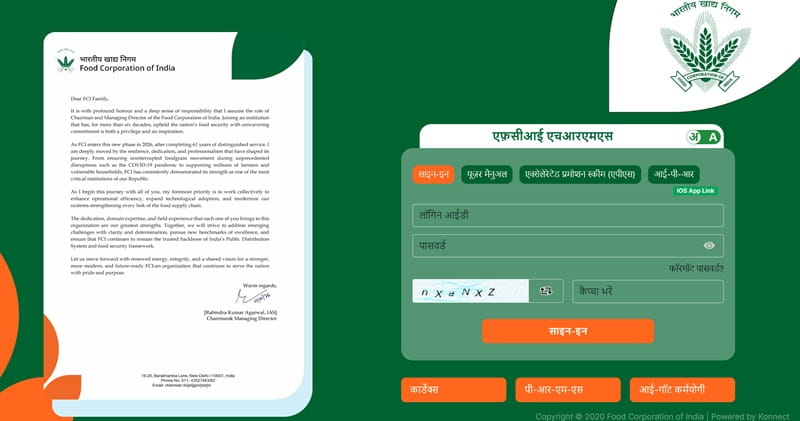
Step 2 — Enter your Employee ID in the username field. This is the unique identifier assigned to you at joining and available on your appointment letter or joining documents.
Step 3 — Enter your Password in the password field. The password is case-sensitive — ensure Caps Lock is off before typing.
Step 4 — Complete the CAPTCHA verification by entering the characters displayed on screen.
Step 5 — Click the “Login” button. The system will verify your credentials and redirect you to your personal HRMS dashboard — your central hub for all HR services.
Mobile App Login:
Step 1 — Download the FCI HRMS Android app from the Google Play Store. iOS users download the app from the link available on the official HRMS portal.
Step 2 — After installation, open the app and enter your Employee ID and Password for the first-time login.
Step 3 — Set up your MPIN for faster subsequent logins — the MPIN allows quick access without entering the full password each time.
Forgot Password? — On the login page, click “Forgot Password.” Reset using your registered email address or mobile OTP. If the account is locked after multiple failed attempts, a 30-minute cooling period applies before automatic unlock. For persistent access issues, contact your nodal officer or HRMS support team — bank details and certain profile changes require nodal officer approval even after reset.
How to Download Payslip from FCI HRMS
Downloading monthly salary slips from FCI HRMS is a straightforward digital process — producing an official PDF payslip that is accepted by banks for loan applications and valid for all financial documentation purposes.
Step 1 — Login to your FCI HRMS account at hrmsfci.in/login.
Step 2 — From your dashboard, navigate to “Reports” in the main menu.
Step 3 — Click on “Payroll” from the reports options.
Step 4 — Select the desired month and year from the dropdown menus.
Step 5 — Click “Download” to save the payslip as a PDF file.
A practical tip worth noting — banks typically request the last six months of payslips for home loan and personal loan applications. Downloading and saving payslips monthly as they become available ensures you always have the required documentation ready without last-minute scrambling.
Key Features of FCI HRMS
FCI HRMS delivers a comprehensive, multi-module HR ecosystem covering every stage of an FCI employee’s professional lifecycle — from daily attendance tracking through retirement and settlement.
Payroll Management — The payroll module automates salary calculation and disbursement — employees access monthly payslips with a complete breakdown of basic pay, all allowances, all deductions, and net salary. Payment history across all months is accessible digitally, eliminating the need to approach the accounts team for historical salary verification.
Leave Management — Employees apply for all categories of leave digitally — checking real-time leave balance, submitting applications with date ranges and reasons, and tracking approval status without physical form submission. Managers receive and process leave requests through the MSS interface on the same platform. Applications typically process within 1-3 working days — employees are advised to apply at least 2 days in advance with clear remarks to avoid rejection delays.
Attendance Management — Daily and monthly attendance records are available for employee review — providing complete visibility into the attendance data that feeds directly into payroll calculations and leave balance computations.
Service Records and Career History — A comprehensive, always-accessible digital service record is maintained — covering posting history, designations held, transfers, promotions, departmental orders, and all service verification documentation. This eliminates the vulnerability of physical service registers and makes career history accessible regardless of how many times an employee has been transferred.
Reimbursement Claims Management — Employees raise and track reimbursement claims — for travel, medical, and other eligible expenses — directly through the portal. The digital workflow replaces physical form submission and manual processing, significantly reducing reimbursement turnaround times.
Medical Services Access — The portal provides access to medical service information and claims for FCI employees entitled to medical benefits — centralising health-related HR functions within the same digital platform.
Training and Development — The HRMS includes a training and development module — enabling HR and management to schedule, communicate, and track employee participation in training programmes designed to enhance skills and operational efficiency.
Department Orders and Circulars — Promotional orders, circulars, policy updates, and departmental communications are distributed and accessible through the HRMS portal — ensuring employees receive official communications directly through a secure, authenticated platform.
Dual ESS and MSS Functionality — The single login environment supporting both Employee Self Service and Manager Self Service within the same account is a key operational advantage — managers do not need separate logins to handle team-level HR tasks alongside their own personal HR management.
Benefits of FCI HRMS
FCI HRMS delivers measurable improvements across every dimension of HR management for both individual employees and the organisation’s administrative efficiency.
Elimination of Office Visit Dependency — The most universally appreciated benefit — routine tasks like payslip download, leave application, and service record queries no longer require visits to HR desks or nodal officers. This is particularly transformative for employees at remote depots and field offices.
24-Hour Accessibility — The web portal and mobile app are accessible round the clock — employees at any location across India access their HR data at any time without geographic or time restrictions.
Complete Salary Transparency — Every component of a FCI employee’s monthly salary — all allowances, all deductions, net pay — is visible with complete clarity. Salary disputes are resolved by the employee reviewing their own data directly without departmental intermediation.
Reduced Administrative Overhead — Automated payroll processing, digital leave approvals, and centralised data management dramatically reduce the manual administrative workload on FCI’s HR and accounts teams — freeing them for strategic rather than transactional work.
Secure Data Architecture — OAuth 2.0 security, session timeout controls, and access-level restrictions provide robust protection for sensitive employee and payroll data across the entire HRMS platform.
Mobile-First Flexibility — With 10,000-plus app installs and both Android and iOS support, FCI HRMS meets employees where they are — on their smartphones — rather than requiring desktop access for every HR task.
FAQs — FCI HRMS
Q1. What is the official URL for FCI HRMS login?
The official login portal is hrmsfci.in/login — the Employee Records System is accessible at ers.hrmsfci.in. Always use the official URL to avoid phishing sites.
Q2. How do I download my FCI HRMS payslip?
Login → Reports → Payroll → Select month and year → Download PDF. Saving the last six months of payslips is recommended as banks typically require six months of salary slips for loan applications.
Q3. Is the FCI HRMS mobile app available for iOS?
The Android app is available directly on Google Play Store. iOS users download the app through the official HRMS portal rather than the Apple App Store — a dedicated iOS-compatible version is provided on the portal.
Q4. What should I do if my FCI HRMS account is locked?
Wait 30 minutes for automatic unlock, then retry. If the issue persists, contact your nodal officer or HRMS support team — they can manually unlock the account and help reset credentials.
Q5. Can I handle both employee and manager HR tasks from the same FCI HRMS login?
Yes — FCI HRMS supports both ESS (Employee Self Service) and MSS (Manager Self Service) from a single login, allowing managers to handle personal HR tasks and team management workflows without switching accounts.